Get a Free Domain for Your New Blog, Then Show Up in Webmaster Communities
Jump to comments ↓The previous post, build a simple blog with Sayori Lite, covers GitHub, Cloudflare Pages, and an optional Obsidian writing workflow.
After setting it up, the default address probably looks something like this:
https://你的项目名.pages.devIt works, but it still feels like something’s missing.
Now that you have a blog, the natural next step is to give it a proper domain and then show up in some webmaster communities. It’s not about getting immediate traffic, but about transforming this website from “a project on my computer” into “a small place with a name on the internet.”
Free Domains Are Good Enough for Now
If you don’t want to buy a domain just yet, you can start with a free subdomain to get some practice.
I currently recommend services like DNSHE:
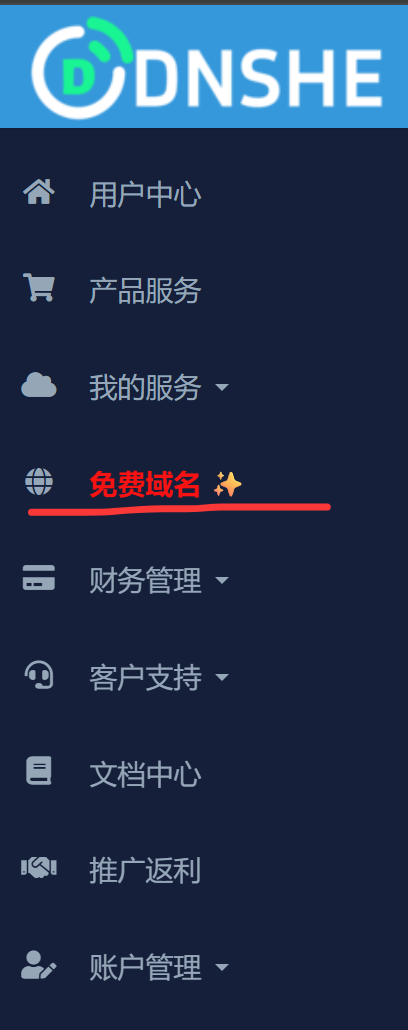
I currently prioritize suffixes like cc.cd that can be integrated with Cloudflare.
Free domains are suitable for these things:
- Binding a custom domain to a Cloudflare Pages blog
- Learning DNS resolution
- Learning Cloudflare hosting
- Preparing subdomains for future self-hosted services
They are not suitable for these things:
- Long-term commercial projects
- Main domain for important email
- Brand entry point you can’t afford to lose
- Projects where you’re completely unwilling to bear the risk of rule changes
DNSHE Boost Codes
DNSHE has a boosting mechanism where you can help each other to get longer-term subdomains.
I’ll put a few boost codes here for now, and add more if I get new ones later:
VJC8UQYTPKGHGMEUGWXAVVN9QFPEULUUJ22RXYDCG4HPCNW7R4If you’re just testing a blog temporarily, you don’t necessarily need to aim for permanence. It’s more important to get a resolvable domain and get the process working.
Official First-Year Free Domains in GitHub Student Pack
If you have a university email and have been verified for the GitHub Student Developer Pack, you can also claim the two official first-year free domain offers:
- Namecheap: One
.metop-level domain free for the first year plus a one-year SSL certificate. - Name.com: One free first-year domain from selected extensions; confirm eligible extensions and renewal rates on the checkout page.
Keep in mind that student pack domains are only free for the first year and renew at standard rates afterward; if you don’t want to worry about renewals, sticking with DNSHE above is very convenient.
Connect to Cloudflare
The Cloudflare free-tier guide covers DNS, Pages, and Tunnel. Here we connect the domain first.
After getting the domain, the next step is to connect it to Cloudflare.
The most common process is:
- Add the site in Cloudflare
- Change the domain’s NS to Cloudflare as prompted
- Wait for DNS to take effect
- Add a custom domain in your Cloudflare Pages project
- Add CNAME records as prompted by Pages or let Cloudflare configure automatically
If you’re using a free subdomain, you need to first confirm if it supports changing NS. If you can’t change NS, you’ll either have to add resolution records on the original platform or switch to a suffix that’s more suitable for Cloudflare.
Don’t rush here; DNS propagation can sometimes take a while. First, make sure you know exactly where your root domain and www / subdomain should point, and don’t forget what you just entered while making changes.
Reserve Subdomains for Self-Hosted Services
Later, if you have a 2C2G student server, you can plan subdomains in advance:
vault.example.cc.cd -> Vaultwardennotes.example.cc.cd -> Fast Note Syncntfy.example.cc.cd -> ntfystatus.example.cc.cd -> GatusDon’t cram all services under the root domain.
Domains are like house numbers. Clear house numbers make moving, migrating, reverse proxying, and shutting down services a bit smoother later on.
For server services, you can check this overview:
What a 2C2G Student Server Can Run: Don’t Overload Your Little Machine Yet
How to Choose Between Free and Formal Domains
I’d categorize them like this:
Free domains are suitable for:
- Just setting up a blog
- Learning DNS
- Creating tutorials
- Testing Cloudflare Pages
- Trying out self-hosted services
Formal domains are suitable for:
- Long-term maintained blogs
- Setting up a formal email
- Putting the address on avatars, business cards, video descriptions
It’s not that free domains are inferior. It’s just that for long-term projects, the biggest fear is “migration will be a pain later.”
If you’ve decided this blog is for the long haul, then buying a domain you like is well worth it. Personal projects allow for a bit of whimsy; if you like the name, you’ll be more motivated to maintain it.
Engaging with Webmaster Communities
Once your domain is set up, you can check out some webmaster communities.
It’s not about aggressively advertising, but about immersing yourself in an environment where people are still blogging. The biggest fear for an independent blog is becoming a solo diary. Occasionally seeing how others write, decorate, and interlink can be very motivating.
Travellings
Travellings is a blogroll relay project:
Its gameplay is quite charming. You place a “Travellings” entry on your website, and visitors who click it will randomly jump to another independent site participating in the project.
Joining instructions:
https://www.travellings.cn/docs/join.html
Suitable for blogs that already have some content.
Don’t apply right after building it with an empty homepage. Write a few articles first so people actually have something to read when they click through.
Moe ICP
Moe ICP is the Moe Country ICP Filing:
Application page:
This isn’t an MIIT filing, don’t misunderstand. It’s more like a fun identifier and community entry point among ACG/personal websites.
The official application page has content requirements, such as being non-commercial, non-gray area, not an empty shell, enabling HTTPS, and being accessible long-term.
If your site’s style is suitable, you can apply for a Moe ICP number and place it in the footer. It doesn’t have any practical necessity, but it has a strong independent website vibe.
Forever Blog
Forever Blog:
Its core is a pact: from the moment you join, your blog won’t shut down for ten years or more, maintaining updates and vitality.
It sounds a bit chuunibyou, but I quite like the idea.
However, this requires one year of operation before you can apply, so just wait for now. Of course, if your site has been running for a year, then you can definitely give it a try, haha.
Jiuchan
Jiuchan:
It’s a personal website indexing and random access platform, somewhat like putting independent sites into a “random discovery” entry.
If your blog already has a few readable articles, you can check out its inclusion documentation. For new sites, the significance of these platforms isn’t about immediately bringing in a lot of traffic, but about giving others a chance to jump from one site to another and gradually discover you.
BlogFinder
BlogFinder - Discover Excellent Personal Blogs
Chinese Independent Blogs List
GitHub:https://github.com/timqian/chinese-independent-blogs
This repository collects Chinese independent blogs. It’s more like a long-term maintained blog index, including blog addresses, RSS, descriptions, and tags.
Who it’s suitable for:
- Those with a stable blog
- Those with RSS
- Content is primarily self-written
- Willing to be publicly indexed
Many people no longer actively subscribe to blogs; information is now queued and distributed by platforms. The Chinese Independent Blogs List at least preserves an old but effective method: subscribe to whoever you like.
If you want to submit your site, make sure these are filled out:
Site NameSite URLRSS URLOne-sentence descriptionTopic tagsOther Free Domain Options
DNSHE isn’t the only option. Here are a few others I’ve seen:
Collection of Free Domains Available for Registration and CF Hosting
https://domain.stackryze.com/ Friendly reminder, you can register four domains, currently only .in and .cc can be hosted by CF.
A little treasure post from nodeloc, it gathers quite a few.
GitHub Pages’ Own Domain
If you don’t want to bother with any domain services for now, GitHub Pages itself gives you one:
你的用户名.github.ioCloudflare Pages also provides one:
你的项目名.pages.devStrictly speaking, these aren’t “your domains,” but they’re sufficient for blogging and showcasing projects. It’s not too late to buy a formal domain once you’ve thought it through.
Add a Comment System to Your Blog
The last post mentioned covering comment systems, so here it is.
A blog can survive without a comment section, but if you’re writing tutorials, experiences, or troubleshooting logs, occasionally receiving a “this helped me” or “I encountered a different issue in step three” can foster communication and your learning, and having a comment section makes it easier to get feedback compared to email contact or similar methods.
Here are a few comment systems I’ve seen that are quite suitable for personal static blogs:
Twikoo
GitHub:https://github.com/twikoojs/twikoo
Twikoo is a widely used comment system in the Chinese independent blogosphere. It supports anonymous comments, email notifications, emojis, and an admin panel.
There are many deployment methods: Vercel, Netlify, cloud functions, self-hosted Docker. For students, free deployment on Vercel is the most hassle-free route.
Pros:
- Chinese ecosystem, friendly documentation
- Deployment cost can be zero
- Admin panel for reviewing, deleting, replying
- Supports email and WeChat notifications
Cons:
- You need to choose a database backend (MongoDB Atlas free tier, or Vercel KV, or self-hosted)
- If using a third-party free database, your data isn’t entirely in your hands
Giscus
GitHub:https://github.com/giscus/giscus
Giscus uses GitHub Discussions as its comment backend. Visitors can only comment after logging in with a GitHub account.
Pros:
- Data is stored in your own GitHub repository
- No extra deployment needed
- Suitable for tech blogs, readers are likely to have GitHub accounts
- Native support for Markdown format and code highlighting
Cons:
- Requires GitHub login
- Non-tech readers might be unwilling to register for GitHub just to leave a comment
- Comments are tied to your repository; changing repositories requires migration
Artalk
GitHub:https://github.com/ArtalkJS/Artalk
Artalk is a self-hosted comment system that requires running a backend service. If you already have a 2C2G server, you can run it with Docker.
Pros:
- Complete control over your data
- Supports multi-site management
- Feature-rich: email notifications, Telegram notifications, CAPTCHA, admin panel
Cons:
- You need a server
- One more service to maintain, back up, and update
- Running one more service on a 2C2G server means you need to watch the memory
How I’d Choose
If you’ve just set up your blog and don’t have a server, I recommend trying Giscus or Twikoo (Vercel deployment) first.
If you already have a server and your readers aren’t all programmers, you might want to look at Artalk.
If you don’t want to bother with comments for now, that’s perfectly fine too. Write your articles first; you can always add comments later when you have readers. A comment system isn’t the core of a blog; content is.
Other Places to Put Links
- Friends page: find bloggers with similar topics to exchange links
- GitHub Profile: put your blog on your personal homepage
- Bilibili / YouTube / Xiaohongshu bio: tutorial videos with article links
- Linux DO / V2EX and other forum signatures: follow community rules, don’t spam
- Open-source project README: if the project is related to your blog, you can include documentation links
Opening up more entry points for your website will naturally lead to more visitors.
Blog Data: Knowing If Anyone’s Visited
After adding a domain and community entries, you might start wondering: is anyone actually reading my blog?
A few lightweight alternatives:
- Umami:https://umami.is/, you can self-host or use the official free version. Clean interface, data under your control.
- Cloudflare Web Analytics:If you’re already using Cloudflare, its built-in Web Analytics is free and requires no extra code; you can just check it in the Dashboard.
- Plausible:https://plausible.io/, primarily paid but can be self-hosted.
- No analytics at all:That’s fine too. A personal blog isn’t a commercial website; it can survive without looking at data.
My current recommendation is to start with Cloudflare Web Analytics (since you’ve likely already connected to Cloudflare), and then consider Umami if you feel it’s not enough someday.
Don’t stare at the numbers every day. Writing is more useful than looking at data.
Finally
Don’t rush to pursue perfection with a freshly set up blog.
If a free domain works, use it for now. If Cloudflare can resolve, get it running. If you can join a community, apply gradually. It’s not too late to add a comment system later.
What’s truly important is to keep writing.
Domains, ICP numbers, friend links, Travellings buttons, comment boxes—these are all little decorations that make a blog feel more like a “site.” The articles are the reason it stands.